Bots find your login in seconds
Every WordPress install shares the same /wp-login.php path. Bots discover and target it the moment your site goes live.
Protect your WordPress login
before attackers reach it.
A free WordPress plugin built for one purpose: stop login attacks. Five focused layers — custom login URL, IP restriction, brute force protection, reCAPTCHA, and login history — work together to keep your admin area off-limits.
Automated bots scan WordPress sites 24/7 looking for /wp-login.php. A single weak credential is all it takes to lose control of your site.
Every WordPress install shares the same /wp-login.php path. Bots discover and target it the moment your site goes live.
Billions of credentials are circulating from past data breaches. If any team member reused a password, your site is already exposed.
A compromised admin account means malware injection, SEO spam, customer data theft — and a long, expensive recovery.
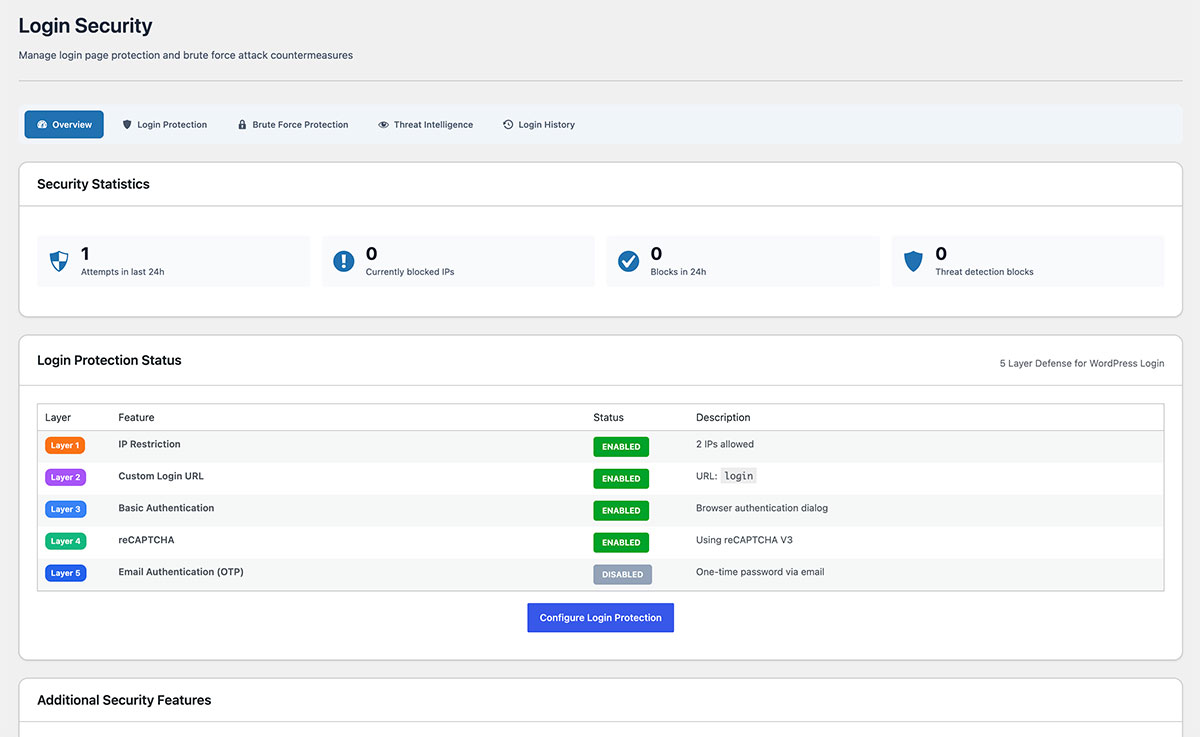
Each layer can be enabled independently. Use one, use all five — every layer makes your login dramatically harder to attack.
Move /wp-login.php to a secret URL only you know. Bots scanning the default path simply hit a 404 — your real login becomes invisible.
Lock the login and admin area down to specific IPs or CIDR ranges. Anyone outside your office, VPN, or trusted network simply cannot reach the form.
Automatically lock out any IP that fails too many login attempts. Stops password guessing and credential stuffing dead in their tracks — and notifies you when it happens.
Add Google reCAPTCHA (v2 or v3) to your login form in one setting. Stops automated form submissions completely — bots cannot pass the challenge.
See exactly who tried to access your site — successes, failures, and lockouts — with timestamps, IPs, and usernames. Investigate suspicious activity in seconds.
No bloat. No upsells inside the plugin. Just focused login protection that you can install and forget about.
All five features are unlocked from day one. No paid tier, no trial limits.
Logic runs only on the login page. Your visitors and SEO scores stay untouched.
Plain-English settings, sensible defaults. Enable the layers you need with a toggle.
Distributed through the official directory — reviewed, signed, and updatable from your dashboard.
Search "SovaryxLoginSecurity" in your WordPress plugin directory and click Install — or download the zip from WordPress.org.
Open the Sovaryx settings page and toggle on the layers that fit your site — start with Custom Login URL and Brute Force.
That's it — bots can't find your login, brute force attempts get locked out, and every attempt is logged.
Yes. All five features are fully unlocked, with no paid tier, no trial limit, no upsell prompts inside the plugin.
No. The plugin only executes on the login and admin login flow. Your frontend pages and visitor experience are completely unaffected.
An emergency bypass key can be generated and stored offline. If you ever lose access, drop a small file via FTP/SFTP to disable IP restriction temporarily.
It runs on any standard WordPress hosting. Requirements: WordPress 6.0+ and PHP 7.4 or higher.
Yes. Network-activate the plugin and configure per-site or network-wide rules from the network admin.
Sovaryx is intentionally narrow. If you only want login protection without a heavy all-in-one suite, this is the lightest, simplest option. If you need scanning, file change monitoring, or security headers, look at a full suite like SentinelSecurity.
SovaryxLoginSecurity focuses only on the login. For vulnerability scanning, file change monitoring, malware detection, and security headers, see SentinelSecurity — built by the same team.
Free on WordPress.org. Five layers of focused login protection, ready to enable in two clicks.