Pro Feature

Vulnerability Assessment

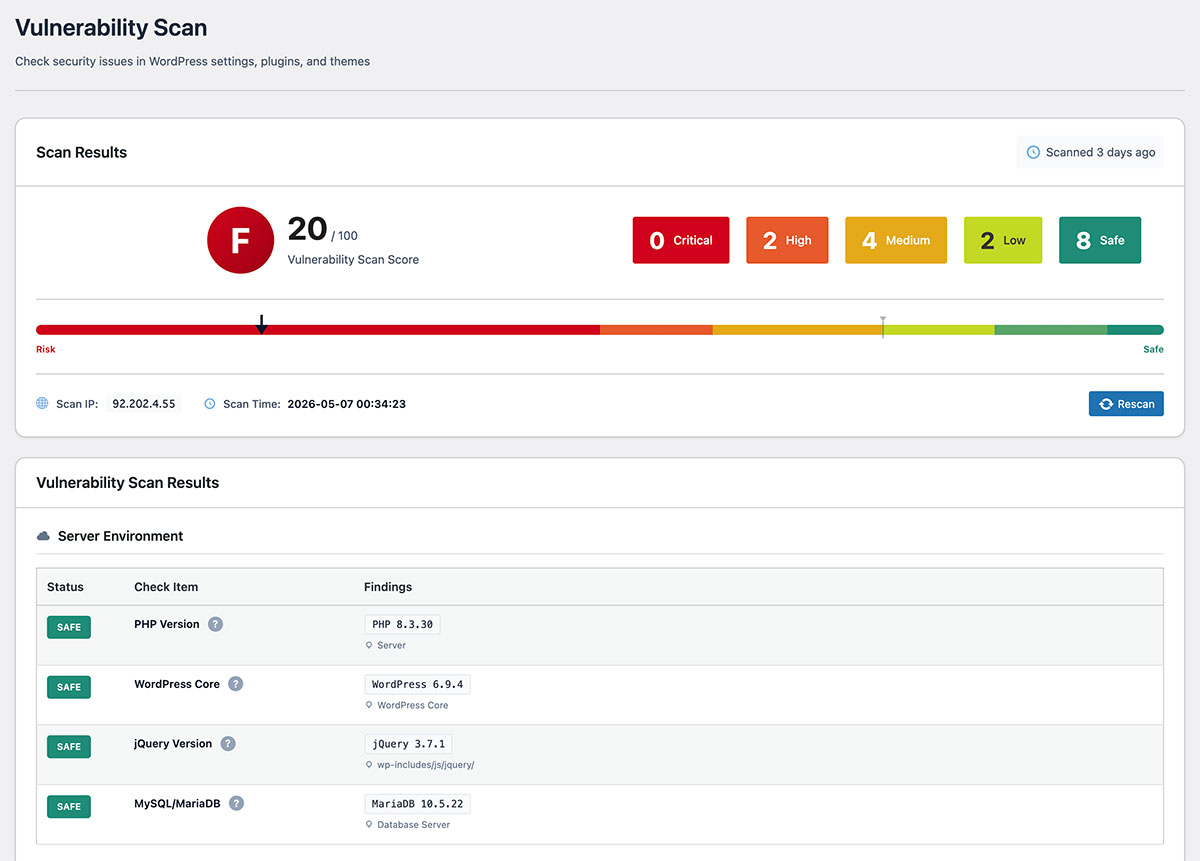
Comprehensive scanning of your WordPress environment across 7 categories and 20 items.
CVE database matching, configuration safety checks,
and component EOL verification all in one.

Vulnerability Scan Results
1 Critical
2 High
5 Medium
Critical
Contact Form 7 < 5.8.1 CVE-2024-12345
High
WooCommerce < 8.5.0 CVE-2024-23456
Medium
Elementor < 3.18.0 CVE-2024-34567

Vulnerabilities Are the Primary Entry Point for Attackers

Thousands of WordPress-related vulnerabilities are reported every year. Leaving outdated versions or vulnerable plugins unpatched makes your site an easy target.

20 Items
Config, CVE & EOL
Check Items
7 Categories
Full WordPress
Environment Coverage
Auto Alert
Email notification
on detection
Vulnerability Scan Results
WordPress 6.4.2
Plugin A CVE-2024-XXXX
Plugin B 3.2.1
Theme CVSS: 8.1
PHP 8.2.0
Scan Complete: 2 vulnerabilities detected
Critical
High

Invisible Vulnerabilities Threaten Your Site

Plugin Vulnerabilities

56% of WordPress attacks come through plugins. Outdated or abandoned plugins are targeted.

Zero-Day Attacks

Attacks can begin within 24 hours of vulnerability disclosure. Early detection is critical.

Deactivated Plugins

Even unused plugins can be attack targets. Vulnerabilities can be exploited even when deactivated.

With SentinelSecurity

Detect known vulnerabilities with a single click using CVE database integration.

Comprehensive Scanning: 7 Categories, 20 Items

From configuration safety checks to CVE/EOL detection, comprehensively check your entire WordPress environment.

WordPress Settings

Basic security settings (6 items)

Debug Mode

WP_DEBUG enabled can leak error information externally.

File Editing

File editing from the admin panel should be disabled.

Table Prefix

Default "wp_" prefix increases SQL injection attack risk.

Security Keys

Warns if any of the 8 security keys are missing or weak.

Force HTTPS

Checks HTTPS enforcement settings for the admin area.

XML-RPC

Enabled XML-RPC increases vulnerability to brute force attacks.

Files, DB & Users

Critical security items (6 items)

wp-config.php Permissions

Warns if wp-config.php permissions are not 400/440/600.

.htaccess Permissions

Writable .htaccess files risk being tampered with.

Suspicious DB Tables

Detects suspicious table names like backup, tmp, old.

Default Admin Username

Warns if an "admin" user exists.

Admin Count

Warns if there are 5 or more administrators.

User Enumeration

Detects user enumeration via ?author=1 or REST API.

Plugins & Themes

Component security (4 items)

Inactive Plugins

Deactivated plugins can still be attack targets.

Outdated Plugins

Warns when plugin updates are available.

Outdated Themes

Warns when theme updates are available.

Unused Themes

Warns if there are 3 or more unused themes.

Server Environment & CVE

Known vulnerabilities and EOL checks (4 items)

PHP CVE/EOL

Check PHP version for CVE vulnerabilities and end-of-life status. Critical warnings for PHP 7.4 and earlier.

WordPress CVE/EOL

Check WordPress core for known CVE vulnerabilities and security release status for older versions.

jQuery CVE

Identify known CVE vulnerabilities (XSS, DoS, etc.) based on jQuery version.

MySQL/MariaDB EOL

Detect end-of-life database versions (MySQL 5.7 and earlier, MariaDB 10.3 and earlier).

Combine with File Integrity Monitoring for Stronger Protection

After finding issues with vulnerability assessment, use file integrity monitoring to instantly detect unauthorized changes. Respond quickly even in case of a breach.

View File Integrity Monitoring

Protect Your Site from Attacks with Vulnerability Assessment

Vulnerability assessment is available with the Pro version.