Free Feature

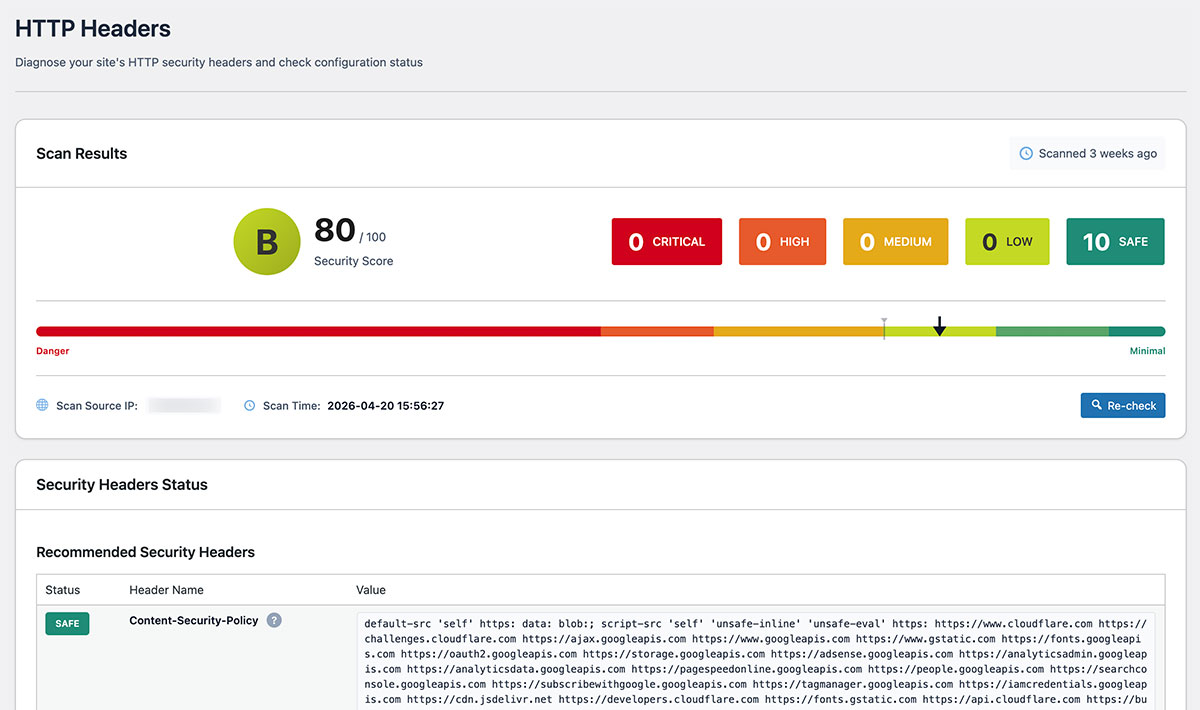
HTTP Header Diagnosis

Analyze HTTP response headers from your web server
to identify security issues.
Get recommended settings and improvement suggestions.

HTTP Header Diagnosis
65 Score
X-Frame-Options SAMEORIGIN
X-Content-Type-Options nosniff
Content-Security-Policy Not Set
Permissions-Policy Not Set

HTTP Headers: The First Line of Web Security Defense

HTTP security headers communicate security policies to browsers.
Properly configured headers can prevent XSS, clickjacking, MIME sniffing,
and many other attacks at the browser level.

80%
Sites without
security headers
24 Items
Security items
diagnosed
Instant
Diagnosis result
display time
HTTP Response Headers
Content-Security-Policy: default-src 'self'
Strict-Transport-Security: max-age=31536000
X-Frame-Options: DENY
X-Content-Type-Options: Not Set
Referrer-Policy: Not Set
Scan complete: 3/5 headers configured
XSS Blocked
MITM Blocked

Why Are So Many Sites
Left Unconfigured?

Invisible to Users

HTTP headers are exchanged between browser and server, invisible to regular users.

Complex Configuration

Requires editing server configuration files, demanding technical knowledge.

Lack of Risk Awareness

Often neglected with the reasoning "there have been no issues so far."

With SentinelSecurity

Diagnose with one click and instantly understand what's missing.

24 Security Items Diagnosed

Diagnoses 11 security headers, 3 CORS headers, 3 cookie attributes, 3 deprecated headers, and 4 WordPress-specific items to visualize security risks.

Essential

Most important headers that must be configured

Content-Security-Policy

CSP

The most powerful header against XSS attacks. Controls which sources can load scripts and resources.

XSS Attack Injection Data Theft

Strict-Transport-Security

HSTS

Enforces HTTPS connections and prevents man-in-the-middle attacks. Guarantees always-encrypted secure communication.

MITM Attack SSL Stripping Eavesdropping
Required

Important headers that should be configured

X-Frame-Options

XFO

Controls iframe embedding to protect against clickjacking attacks.

X-Content-Type-Options

XCTO

Prevents MIME type sniffing and blocks content spoofing.

Recommended

Headers recommended to configure

Referrer-Policy

Controls referrer information sent when navigating to other sites. Prevents leaking sensitive data in URLs.

Permissions-Policy

Controls access to browser features like camera, microphone, and geolocation to prevent unauthorized use.

Cross-Origin-Embedder-Policy

COEP

Controls cross-origin resource embedding. Prevents side-channel attacks like Spectre.

Cross-Origin-Opener-Policy

COOP

Controls access to cross-origin windows. Prevents information leaks between windows.

Cross-Origin-Resource-Policy

CORP

Controls cross-origin resource loading. Prevents unauthorized use of images and scripts.

X-Permitted-Cross-Domain-Policies

XPCDP

Controls cross-domain access by Adobe Flash and similar technologies.

Clear-Site-Data

Clears browser cache, cookies, and storage on logout. Ensures complete session data removal.

Cookie

Cookie security attribute configuration

Secure

Sends cookies only over HTTPS. Prevents eavesdropping and network attacks.

HttpOnly

Prevents JavaScript access to cookies. Blocks cookie theft via XSS.

SameSite

Controls cookie transmission on cross-site requests. Prevents CSRF attacks.

Understand Your Security Status
with HTTP Header Diagnosis

All HTTP header diagnosis features are available in the free version.