REST API Diagnosis

28 checks.
Find every hidden leak.

Scan every REST API endpoint for security risks. Detect user enumeration, exposed settings, and unauthenticated access — categorized by severity, before attackers find them.

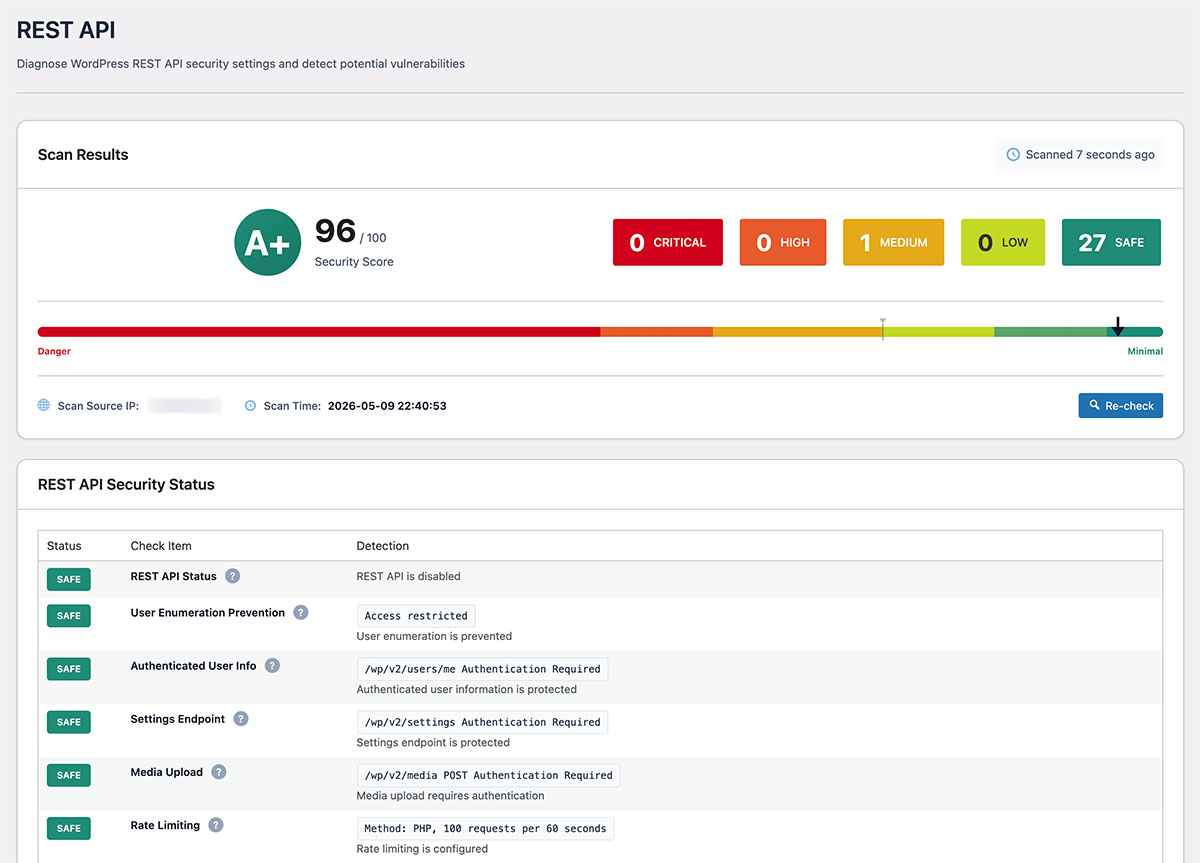
REST API Diagnosis scan results screen

Why REST API Diagnosis?

Every default install
leaks data through the API.

A standard WordPress install exposes user data, site structure, and configuration details through the REST API — without requiring any authentication. A one-click scan surfaces every risk across 28 security checks.

Default
WordPress exposes user data and settings via REST API without extra configuration
28 Checks
Across endpoint security, authentication, CORS, cookies & WordPress-specific risks
Free
Full REST API diagnosis with actionable recommendations, at no cost
REST API Endpoints
GET /wp-json/wp/v2/users
GET /wp-json/wp/v2/posts
GET /wp-json/wp/v2/settings
GET /wp-json/wp/v2/comments
GET /wp-json/
Action required: 2/5 endpoints are publicly exposed
User Enum
Data Leak

REST API
Data Leak Risks

User Enumeration

Accessing /wp-json/wp/v2/users may expose usernames and email addresses.

Unauthenticated Access

Many endpoints are accessible without login, allowing external information gathering.

Used for Attack Reconnaissance

Exposed plugin info and site configuration can be used as a foothold for targeted attacks.

With SentinelSecurity

Instantly detect exposed endpoints and suggest appropriate countermeasures.

What we check

Every REST endpoint, mapped to a real-world risk.

WordPress exposes dozens of REST API endpoints by default. SentinelSecurity inspects 28 of them and groups the results by the actual risk to your site — not by acronym or technical name.

28 endpoints inspected across 5 risk categories

01

Stop your user list and admin tools from being public

By default, anyone on the internet can list your usernames, read parts of your settings, or even upload files through the REST API. These three checks are the ones that actually get sites compromised.

  • /wp/v2/users

    すべての著者のユーザー名を返します — ブルートフォース攻撃のほぼすべてがここから始まります。

  • /wp/v2/settings

    Exposes site-level configuration that should only be readable by administrators.

  • /wp/v2/media · upload

    Confirms file upload is locked to authenticated users — otherwise attackers can drop in malware.

02

Close the seven endpoints attackers reach for next

Once the obvious holes are closed, attackers move to subtler ones: missing rate limits, draft posts that should be private, and custom plugin endpoints with weak permission checks.

  • /wp/v2/users/me

    Verifies that information about logged-in users is not leaked to anonymous visitors.

  • Rate limit · per IP

    Without throttling, a single attacker can hammer your API for password guesses or DoS.

  • /wp/v2/comments

    Anonymous comment posting is a common vector for spam and malicious links.

  • /wp/v2/themes · plugins

    Exposing your active themes and plugins gives attackers an instant CVE shopping list.

  • Draft & private posts

    Confirms that unpublished drafts cannot be read by anonymous users.

  • Custom plugin endpoints

    Many plugins ship endpoints with weak permission_callback — we flag the risky ones.

  • REST nonce validation

    Without a valid nonce, your API can be tricked into accepting CSRF or replay attacks.

03

Tidy up the eight items that quietly leak data

これらの項目は直ちに深刻な被害をもたらすわけではありませんが、バージョン情報・著者のEXIF GPS・投稿リビジョンなど、攻撃の足がかりとなる情報を少しずつ漏らします。SentinelSecurityは分かりやすい言葉でそれらを可視化します。

  • Basic authentication

    Should be off in production — credentials travel base64-encoded with every request.

  • Anonymous read-access

    Some endpoints should require login. We highlight ones still readable by anyone.

  • CORS configuration

    A wildcard Access-Control-Allow-Origin lets any external site read your API.

  • Media metadata · EXIF

    Photos uploaded to your library can leak GPS coordinates and camera serial numbers.

  • WordPress version

    Returned in API discovery responses — making vulnerability scanning trivial.

  • /wp/v2/search

    Can be abused to enumerate post IDs and find content you forgot to set private.

  • Post revisions

    Old drafts of an article can resurface text you thought you had removed.

  • API query filters

    Plugin-supplied filters sometimes pass user input straight into SQL — we look for the patterns.

04

Two endpoints that are usually safe — but worth checking

Low impact, but they do show up in penetration-test reports. If you are not actively using them, switching them off removes them from your attack surface entirely.

  • /oembed/1.0

    他サイトへの投稿埋め込みに使われます。埋め込みを使用しない場合は無効化を推奨します。

  • XML-RPC

    Legacy API that is now mainly used by attackers for amplified brute-force.

05

Visibility into what your API actually exposes

Eight informational checks that map out your API surface — namespaces, post types, taxonomies, JWT plugins. Not vulnerabilities themselves, but essential context for the rest of the report.

  • REST API enabled

    Whether the REST API is on at all and which prefix it answers on.

  • REST discovery in HTML

    Detects whether your homepage advertises the API URL in its HTML head.

  • Application passwords

    Reports whether the per-app token feature (WP 5.6+) is enabled.

  • JWT auth plugins

    Identifies common JWT auth plugins and their version.

  • Post types · taxonomies · namespaces

    Lists every custom post type, taxonomy and plugin namespace that the API exposes.

Understand Your Data Leak Risks
with REST API Diagnosis.

Protect your WordPress site with SentinelSecurity's comprehensive security features.