API Protection
Lock down your REST API.
Stop abuse before it starts.
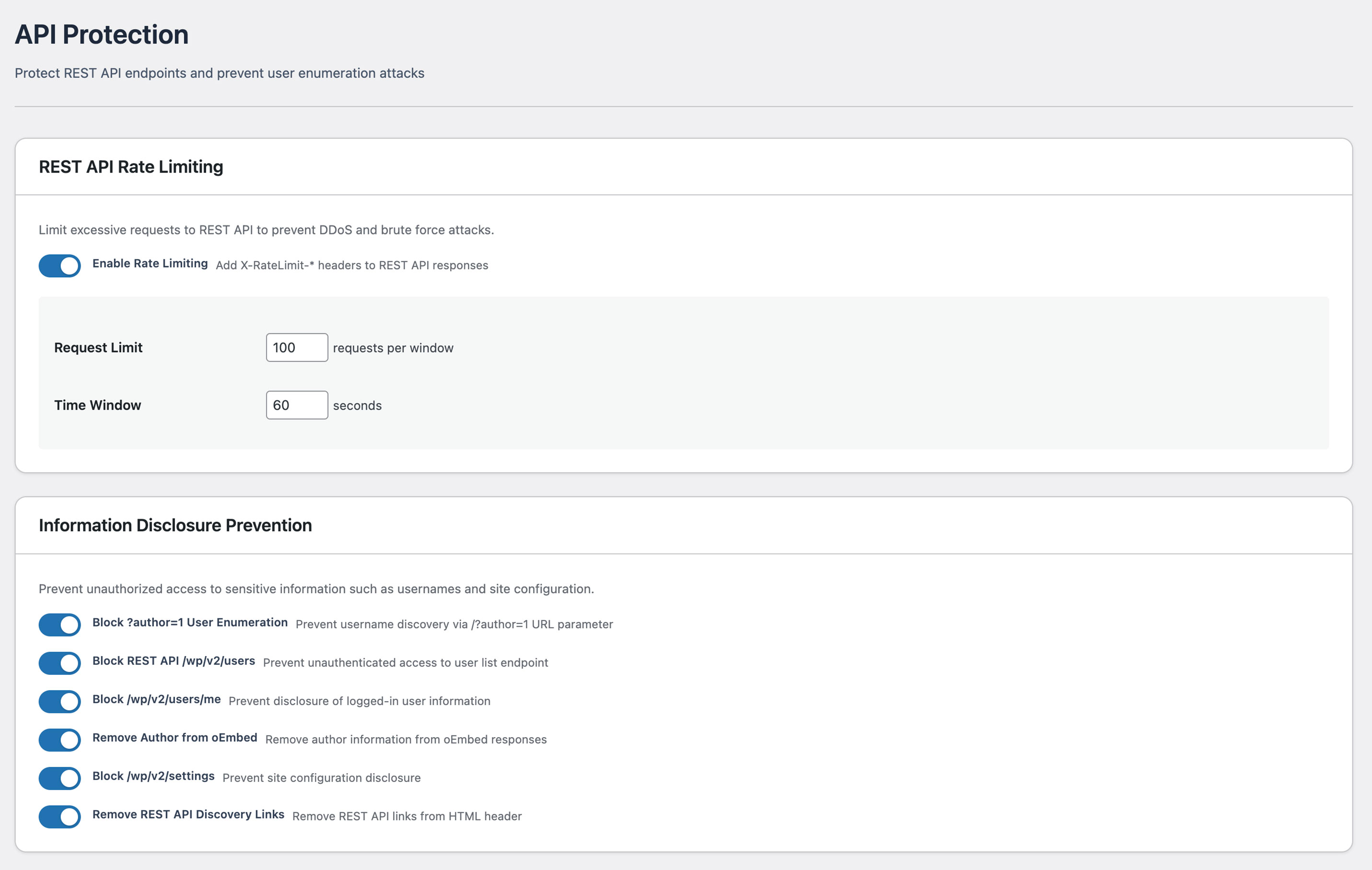
Protect your WordPress REST API with 7 security controls. Rate limiting, user enumeration prevention, and endpoint protection — stop information leaks and API abuse at the source.
Why API Protection?
Your REST API exposes
every username by default.
WordPress REST API is enabled out of the box and returns registered usernames without authentication. This information can be used by attackers to support targeted brute force attacks.
What we protect
Seven protections. Each one explained in plain language.
SentinelSecurity ships 7 protections for the WordPress REST API, grouped into three areas. Here is what each one does — no technical background required.
Stop attackers from harvesting your usernames
Brute-force attacks always start with a list of valid usernames. WordPress hands that list out for free through three different doors — SentinelSecurity closes all of them.
-
Block the ?author redirect
Adding ?author=1 to any URL normally reveals a user's login name. SentinelSecurity blocks that redirect so the response is the homepage — nothing useful for an attacker.
-
Require login for the user list
The REST API user endpoint lists every account on your site. SentinelSecurity makes it visible only to logged-in users — anonymous visitors receive nothing.
-
Lock /users/me to authorised tools only
This endpoint can expose session details about the logged-in account. SentinelSecurity blocks all anonymous calls while your dashboard and trusted apps continue to use it normally.
Hide your site's configuration and the API itself
Even when no usernames leak, your site quietly broadcasts a roadmap: site settings, embedded author info, even the API's URL in your homepage HTML. SentinelSecurity removes each signal.
-
Block anonymous access to /settings
The settings endpoint can reveal which plugins, languages and timezones you run. SentinelSecurity makes it accessible only to administrators — site configuration stays invisible to outsiders.
-
Strip author info from oEmbed responses
When a post is shared on social media, the oEmbed response normally includes the author's name and login slug. SentinelSecurity removes that data — posts still preview correctly, just without the attribution.
-
Remove the API discovery link
WordPress advertises the REST API address in every page's HTML head. SentinelSecurity removes that line — tools that already know the address keep working, automated scanners no longer get a pointer.
Throttle bulk requests before they overwhelm you
Even legitimate endpoints get abused. Without rate limits, a single attacker can pull every post, hammer search, or run thousands of password guesses per minute. SentinelSecurity adds standards-based throttling — fully tunable to your traffic.
-
Per-IP rate limit with 429 responses
SentinelSecurity counts API requests per IP address and returns a standard 429 response when the limit is reached. Headers like X-RateLimit-Remaining help well-behaved clients back off gracefully.
-
Tune limits or turn any protection off
Each of the 7 protections has its own toggle and adjustable values. Set the request count and time window to suit your traffic — no protection is mandatory.
Related Feature
Start by Checking Your Current Status with REST API Diagnosis
Before configuring API protection, check your site's current status with REST API Diagnosis. Understand which endpoints are exposed, then apply the appropriate protection settings.
Other Features
Explore Other SentinelSecurity Features
SentinelSecurity covers every security aspect of your WordPress site — from vulnerability scanning to file monitoring and email notifications.
Login Security
Multi-layer protection for your WordPress login. IP lockout, 2FA, and CAPTCHA to stop attackers before they get in.
Learn moreHTTP Header Diagnosis
Diagnose security header configuration and get actionable recommendations to fix missing or misconfigured headers.
Learn moreREST API Diagnosis
Check WordPress REST API security across 18 items. Identify information exposure risks before attackers find them.
Learn moreVulnerability Assessment
Check WordPress configuration, software versions, and file permissions for security risks. Get a risk score in one click.
Learn moreFile Integrity Monitoring
Detect file additions, changes, and deletions across WordPress directories. Instant alerts for unauthorized modifications.
Learn moreSecurity Header Settings
Easy GUI setup for CSP, HSTS, and other security headers. Smart scan auto-generates optimal settings.
Learn moreEmail Notification Settings
Fully customizable notifications for login events, file changes, and vulnerability discoveries. White-label ready.
Learn moreProtect Your Site with API Protection
Protect your WordPress site with SentinelSecurity's comprehensive security features.