Email Notification Settings
Security events happen silently.
Know the moment they occur.
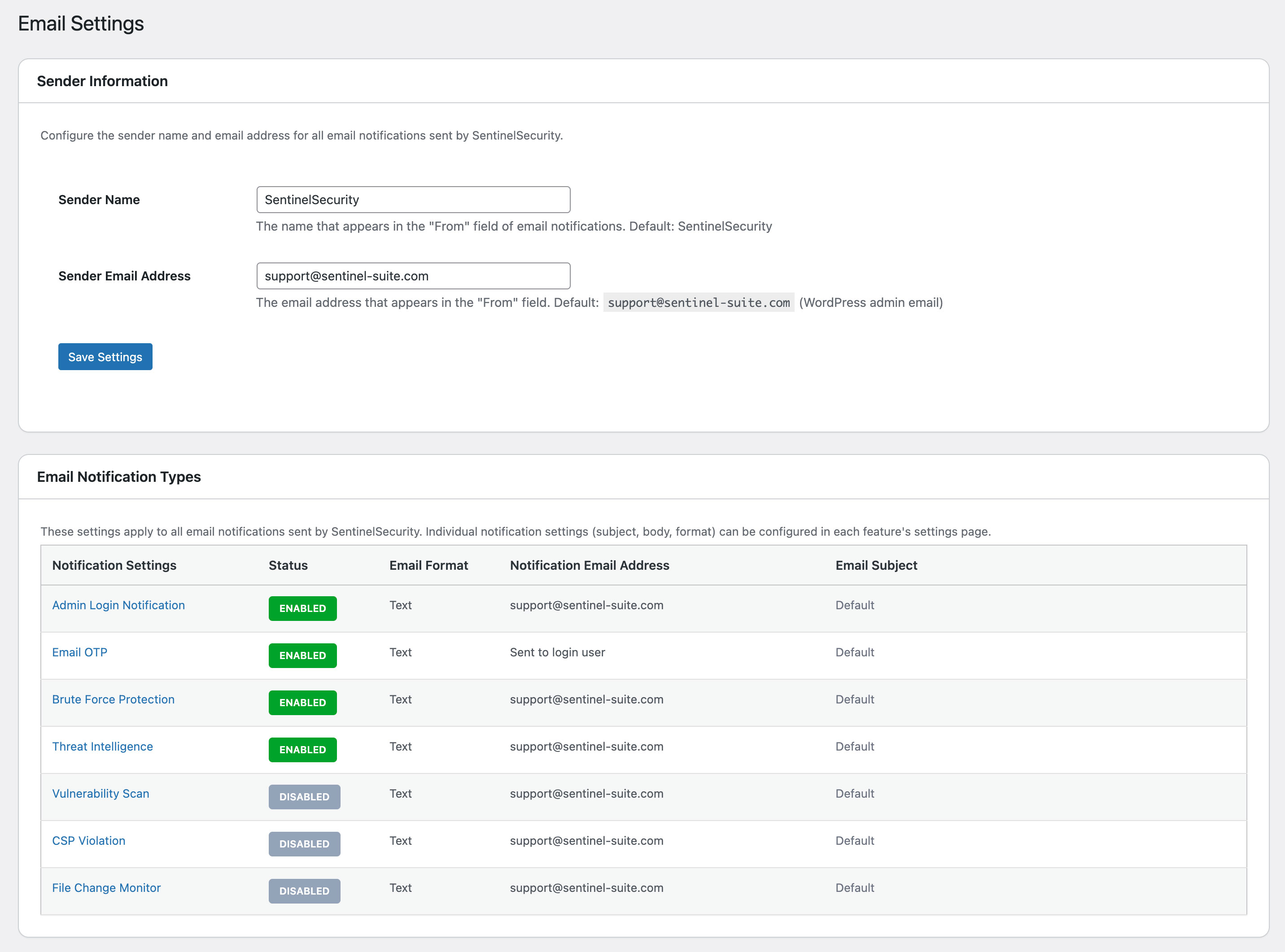
Unauthorized logins, file changes, brute force attacks, CSP violations — none of these notify you by default. SentinelSecurity sends an immediate alert the moment any of 7 critical security events occur, with full control over what each notification says and who receives it.
Why Notifications Matter?
Security events go unnoticed
for days without alerts.
An admin login at 3 AM, a file changed overnight, a brute force attack in progress — WordPress does not email you about any of these by default. SentinelSecurity closes that gap with instant alerts for every critical event, so you can act before damage is done.
Your site doesn't warn you. SentinelSecurity does.
Know before your visitors do
File changes, unauthorized logins, and brute force attempts happen in the background. An instant alert lets you respond before the issue escalates or affects visitors.
Plain language — no security jargon
Default plugin notifications use technical terms most site owners don't understand. SentinelSecurity lets you rewrite every notification in plain language that drives the right action.
White-label ready for agencies
Send alerts under your company name and email address. Deliver professional security monitoring services to clients without exposing the plugin name.
管理者がサイトにログインしました。
このログインに心当たりがない場合は、すぐにご連絡ください。
An alert for every security event that matters.
Each notification type is independent — customize the sender, subject, and body text separately for each one.
Admin Login
Fires every time an admin logs in — username, IP address, and browser sent the moment they authenticate.
Email OTP
Delivers the two-factor code for login verification — includes passcode, expiration time, and origin IP.
Brute Force Protection
Triggered when an IP is blocked after repeated failed login attempts — reports IP, attempt count, and block duration.
Threat Intelligence
Fires when a known malicious IP is blocked before it reaches your site — includes the IP and its threat score.
Vulnerability Assessment
Sent after each scan completes — includes your current score, threshold, and a list of detected vulnerabilities.
CSP Violation
Fires when a browser blocks a resource that violates your Content Security Policy — reports blocked domain, directive, and page URL.
File Integrity Monitoring
Detects files added, modified, or deleted on your site — counts every change and flags anything suspicious.
Every field is editable.
Set each notification to match your brand — or rewrite it in plain language your clients can act on.
Sender Information
- From name (company/team name)
- From email address
- Reply-to address
Subject
- Subject templates
- Variable insertion (date, username, etc.)
- Priority markers
Body
- Greeting and description text
- Technical term replacement
- Signature and footer info
Variables
- {site_name} - Site name
- {user_name} - Username
- {ip_address} - IP address
- {datetime} - Date/time
- ...and many more
How You Can Use It
Agency Maintenance Services
Send security notifications under your company name. Offer your own security monitoring service without revealing the plugin name.
Simplified for Clients
Replace technical terms with plain language. For example, "Brute force attack" becomes "Unauthorized login attempt" — easy to understand for non-technical clients.
Personal Site Management
Customize the subject line and body text so alerts are easy to act on at a glance. Reduce notification fatigue and never miss a critical security event on your own site.
The Effect of Customization
See how notifications change compared to the default.
🔐 管理者ログイン通知
管理者アカウントへのログインが検知されました。
ユーザー名: admin
IPアドレス: 192.0.2.1
ブラウザ: Mozilla/5.0...
このログインに心当たりがない場合は、すぐにパスワードを変更してください。
🔒 SentinelSecurity
このメールは自動送信されました。
お客様
管理者がサイトにログインしました。
ログイン日時: 2026年2月6日 14:30
アクセス元: 192.0.2.1
このログインに心当たりがない場合は、すぐにご連絡ください。
Company X セキュリティチーム
support@example.com
Other Features
Explore Other SentinelSecurity Features
SentinelSecurity covers every security aspect of your WordPress site — from vulnerability scanning to file monitoring and email notifications.
Login Security
Multi-layer protection for your WordPress login. IP lockout, 2FA, and CAPTCHA to stop attackers before they get in.
Learn moreHTTP Header Diagnosis
Diagnose security header configuration and get actionable recommendations to fix missing or misconfigured headers.
Learn moreREST API Diagnosis
Check WordPress REST API security across 18 items. Identify information exposure risks before attackers find them.
Learn moreAPI Protection
REST API rate limiting and user enumeration prevention to block API-based information leaks and abuse.
Learn moreVulnerability Assessment
Check WordPress configuration, software versions, and file permissions for security risks. Get a risk score in one click.
Learn moreFile Integrity Monitoring
Detect file additions, changes, and deletions across WordPress directories. Instant alerts for unauthorized modifications.
Learn moreSecurity Header Settings
Easy GUI setup for CSP, HSTS, and other security headers. Smart scan auto-generates optimal settings.
Learn more
Know the moment something changes
on your WordPress site.
Protect your WordPress site with SentinelSecurity's comprehensive security features.