Vulnerability Assessment

Find vulnerabilities
before attackers do.

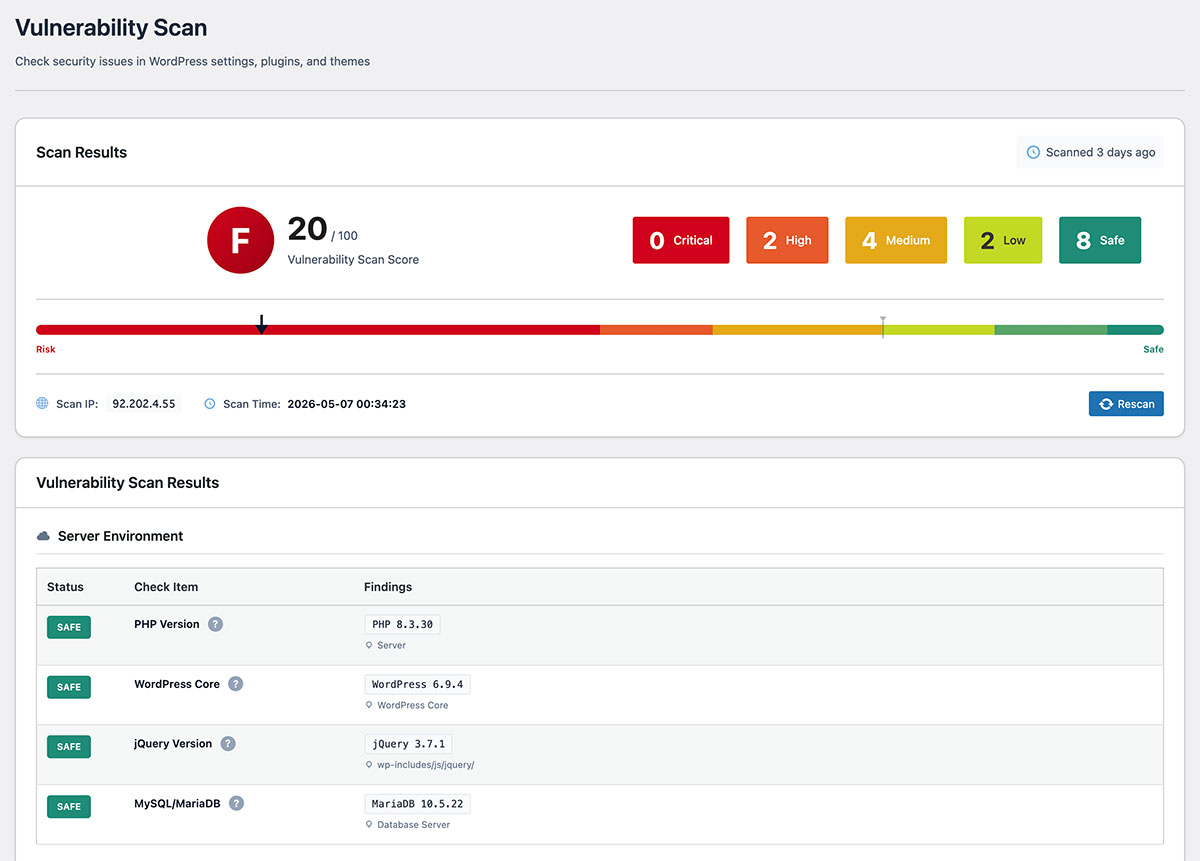
Scans your WordPress environment across 7 categories and 20 items. Checks configuration settings, file permissions, software versions, and EOL status — all in one click.

Vulnerability scan results

Why Vulnerability Assessment?

Outdated plugins and themes
are the #1 entry point.

Most WordPress compromises trace back to an outdated plugin, an abandoned theme, or a misconfigured setting. Catching these before an attacker does is the most practical thing you can do.

20
security checks across 7 categories
A–F
risk grade assigned instantly after every scan
< 30s
to complete a full scan with one click
Vulnerability Scan Results
WordPress 6.4.2
Plugin A Update available
Plugin B 3.2.1
Theme Outdated
PHP 8.2.0
Scan Complete: 2 vulnerabilities detected
Critical
High

Hidden Vulnerabilities Can Affect Your Site

Plugin Vulnerabilities

56% of WordPress attacks come through plugins. Outdated or abandoned plugins are targeted.

Slow Update Cycles

Outdated plugins and themes are the most common reason sites get compromised. Regular version checks keep you ahead.

Deactivated Plugins

Even unused plugins can be attack targets. Vulnerabilities can be exploited even when deactivated.

With SentinelSecurity

Identify configuration risks and outdated components with a single scan — no security expertise needed.

What we check

Every check, mapped to a real-world risk.

SentinelSecurity runs 20 vulnerability checks across your WordPress install. Rather than a flat list, we group them by what could actually go wrong — so you understand the why, not just the what.

20 checks across 4 risk areas

01

Patch the foundation: outdated PHP, WordPress and database

A site running on end-of-life PHP or an unpatched WordPress core is the single biggest reason WordPress sites get compromised. We cross-check every component against the public CVE database and EOL schedules.

  • PHP · CVE & EOL

    Detects PHP 7.4 and earlier, plus any current version with a known CVE — your top patching priority.

  • WordPress core · CVE & EOL

    Compares your core version against published security releases. Flags anything that no longer receives fixes.

  • jQuery · CVE

    Finds outdated jQuery shipped by your theme — the source of many DOM-XSS issues.

  • MySQL / MariaDB · EOL

    Detects database versions (MySQL ≤ 5.7, MariaDB ≤ 10.3) that no longer receive security patches.

02

Lock down files, accounts and the database

Most successful attacks exploit boring basics — wrong file permissions, an admin account literally called “admin”, or a forgotten backup table sitting in the database. We check the six fundamentals.

  • wp-config.php · permissions

    Confirms that database credentials are not world-readable on the server.

  • .htaccess · permissions

    Detects .htaccess files that an attacker could rewrite to redirect or backdoor the site.

  • Suspicious database tables

    Flags tables named backup, tmp, old — common signs of a forgotten or malicious dump.

  • Default “admin” user

    Warns if an account with username “admin” still exists — half the brute-force battle won.

  • Administrator count

    Highlights when more than five users hold full admin rights — a sign of privilege sprawl.

  • User enumeration

    Tests whether ?author=1 or the REST API will hand over your usernames to anyone.

03

Tighten WordPress’s built-in settings

Six configuration values that ship with WordPress and quietly determine whether common attacks succeed. None of these require a developer to fix.

  • WP_DEBUG

    Confirms debug output is off in production — error messages are gold for attackers.

  • DISALLOW_FILE_EDIT

    Disables editing PHP files from inside the dashboard, where one stolen cookie = full code execution.

  • Database table prefix

    Detects the default “wp_” prefix, which makes generic SQL-injection payloads effective.

  • Authentication keys & salts

    Verifies that all 8 secrets in wp-config.php are present and sufficiently random.

  • FORCE_SSL_ADMIN

    Confirms admin sessions are always served over HTTPS — never plain HTTP.

  • XML-RPC

    Detects XML-RPC, the legacy interface that today is mostly used for amplified brute-force.

04

Clean up plugins and themes — the #1 breach vector

Patchstack reports that 97% of WordPress vulnerabilities live in plugins and themes — including the ones you deactivated but forgot to delete. We surface every dormant or out-of-date component.

  • Inactive plugins

    Deactivated code is still on disk — and still exploitable. We flag them for deletion.

  • Outdated plugins

    Lists every plugin behind its latest release, with link to the changelog.

  • Outdated themes

    Same idea for themes — including the parent theme behind your child theme.

  • Unused themes

    Warns when more than three unused themes are installed — every one of them is attack surface.

Find vulnerabilities
before they find you.

Protect your WordPress site with SentinelSecurity's comprehensive security features.